webwright
Turn your coding agent into a SOTA browser agent. Drives a local Playwright workspace via one bash command at a time, saving screenshots and an action log into final_runs/run_<id>/, and visually self-verifies the result.
pinned to #4a46f28updated last month
Ask your AI client: “install plugins/webwright”.
Requires the metahub MCP server installed in your client. Set up MCP.
mh install plugins/webwrightmetahub onboarded this repo on the author's behalf.
If you own github.com/microsoft/Webwright on GitHub, claim the listing to take over publishing. Your claim preserves the existing eval history and badges; only the curator label is replaced with verified-publisher on your next publish.
Stars
5,524
Last commit
last month
Latest release
published
What's bundled
Items extracted from this plugin's manifest + directory tree.
Skills (1)
skills/webwrightSolve a user-specified web task code-as-action style by driving a local Playwright browser through one bash command at a time, saving screenshots and an action log into `final_runs/run_<id>/`, and …
Evaluation report
WarningsAutomated checks the publisher passed at publish time — structure, docs, safety, and whether the artifact behaves as claimed.4a46f28· last month
Documentation
41Description quality
34 words · 220 chars — "Turn your coding agent into a SOTA browser agent. Drives a local Playwright work…"
README is present and substantial
18,977 chars · 10 sections · 20 code blocks
Tags / topics declaredwarn
No manifest tags and no GitHub repo topics
Add tags to the manifest (or GitHub topics on the repo) so the registry's search and category filters surface this artifact.
README has usage / example sections
found: How to use
Homepage / docs URL declared
https://github.com/microsoft/Webwright
Release history
1- releasecurrent4a46f28warnlast month
Contents
🗺️ Project Map
webwright/
├── pyproject.toml           # package: webwright
├── src/webwright/
│   ├── run/cli.py           # CLI entrypoint (`webwright`)
│   ├── agents/default.py    # core agent loop
│   ├── environments/        # Playwright browser workspace
│   ├── tools/               # image_qa, self_reflection
│   ├── models/              # openai_model, anthropic_model, base
│   ├── config/              # base.yaml, model_openai.yaml, model_claude.yaml
│   └── utils/
├── assets/
│   └── task_showcase/       # tiny Flask dashboard for repeatable runs
│       ├── app.py
│       ├── templates/       # dashboard.html, task.html
│       └── tasks/<short_id>/ # task.json + report.json per task
├── tests/
└── outputs/                 # run artifacts (trajectories, screenshots)
📰 Task Showcase (repeatable runs as a dashboard)
A tiny Flask app under assets/task_showcase/ consolidates
Webwright runs for repeatable odyssey tasks (deals, inventory, listings,
job boards, weather, etc.) into a single dashboard. Each task ships only two
files — task.json (metadata) and report.json (curated, structured output:
sources + result sections like tables, lists, summaries) — and the templates
render them generically, so adding a new task is just dropping a new folder
in assets/task_showcase/tasks/.
pip install flask
python assets/task_showcase/app.py    # http://127.0.0.1:5005
To have Webwright produce a renderer-ready task folder at runtime, stack the Task Showcase overlay:
python -m webwright.run.cli \
    -c base.yaml -c model_openai.yaml -c task_showcase.yaml \
    -t "<repeatable web task>" \
    --task-id my_repeatable_task \
    -o outputs/default
Note:
report.jsonis only generated when-c task_showcase.yamlis included. A plainbase.yamlrun producestrajectory.jsonand debug artifacts but noreport.json.
The run writes task_showcase/tasks/<short_id>/task.json and report.json
inside the output workspace. Render those generated files without copying them
back into the repo:
python assets/task_showcase/app.py \
    --tasks-dir outputs/default/<run>/task_showcase/tasks
🚀 Quick Start
Prerequisites
- Python 3.10+
- Chromium installed through Playwright
- An API key for your chosen backend (OpenAI, Anthropic, or OpenRouter)
Install
pip install -e .
playwright install chromium
Run
Export credentials for the configured backend (for example, OPENAI_API_KEY
with model_openai.yaml or ANTHROPIC_API_KEY with model_claude.yaml). The
image_qa and self_reflection tools use the same configured model by default,
so an Anthropic run does not require an OpenAI key. Then:
python -m webwright.run.cli \
    -c base.yaml -c model_openai.yaml \
    -t "Search for flights from SEA to JFK on 2026-08-15 to 2026-08-20" \
    --start-url https://www.google.com/flights \
    --task-id demo_openai \
    -o outputs/default
🚩 Flags
| Flag | Description |
|---|---|
-c | Config file(s) from src/webwright/config/ (stackable). |
-t | Task instruction. |
--start-url | Initial page. |
--task-id | Output subfolder name. |
-o | Output directory. |
🔌 Use as a Plugin
Webwright ships plugin manifests for both Claude Code (.claude-plugin/plugin.json) and OpenAI Codex (.codex-plugin/plugin.json), with the shared skill at skills/webwright/ and slash commands at skills/webwright/commands/. The host agent drives the Webwright loop natively — no extra LLM API key or cost beyond your host subscription. Hosts that read PNG screenshots natively skip the image_qa / self_reflection tools.
Common runtime deps (install once after either path):
pip install -e .
playwright install chromium
<b>Claude Code</b>
Install
Install through the bundled marketplace inside Claude Code:
# 1. Add this repo as a Claude Code plugin marketplace
/plugin marketplace add microsoft/Webwright

# 2. Install the plugin from that marketplace
/plugin install webwright@webwright
Prefer a local checkout? Point the marketplace command at the cloned repo instead:
/plugin marketplace add /absolute/path/to/Webwright
/plugin install webwright@webwright
Use
Start a new Claude Code session after installing — plugins are loaded at session start and won't appear until you restart.
You can either ask Claude Code in plain English (the skill auto-activates from its description), or use one of the slash commands:
/webwright:run search Google Flights for flights from SEA to JFK on 2026-08-15 to 2026-08-20
/webwright:craft search a ticket on Google Flights from LAX to SFO depart June 7 return June 14
/webwright:run(or any plain prompt) produces a one-shotfinal_script.pyfor the literal task values./webwright:craftproduces a reusable CLI tool:final_script.pybecomes one parameterized function with a Google-styleArgs:docstring and anargparsewrapper whose flags default to the concrete task values, so you can rerun it later with different arguments — e.g.python final_script.py --origin JFK --destination LAX --depart-date 2026-07-01.
In both modes Claude Code scaffolds a workspace with plan.md, runs instrumented Playwright scripts under final_runs/run_<id>/, and visually self-verifies each critical point against the saved screenshots.
<b>OpenAI Codex</b>
Install
Codex reads Claude-style marketplaces, so the same repo works as a Codex plugin marketplace. From the Codex CLI:
# 1. Add this repo as a Codex plugin marketplace
codex plugin marketplace add microsoft/Webwright

# 2. Open the plugin browser and install Webwright
codex
/plugins
Prefer a local checkout?
codex plugin marketplace add /absolute/path/to/Webwright
Then restart Codex so the new marketplace and plugin are picked up.
Use
In a new Codex thread, either ask in plain English (the skill auto-activates from its description) or invoke the bundled skill explicitly with @webwright:
@webwright search Google Flights for flights from SEA to JFK on 2026-08-15 to 2026-08-20
Codex scaffolds a workspace with plan.md, runs instrumented Playwright scripts under final_runs/run_<id>/, and visually self-verifies each critical point against the saved screenshots.
To turn the plugin off without uninstalling, set its entry in ~/.codex/config.toml to enabled = false and restart Codex.
<b>🦞 OpenClaw</b>
Install
Install directly from a local checkout (path, archive, npm spec, git repo, or clawhub: spec all work):
openclaw plugins install /absolute/path/to/Webwright
openclaw gateway restart   # reload so the plugin and skill are picked up
Verify:
openclaw plugins list | grep webwright
openclaw skills  list | grep webwright   # should show "✓ ready"
Use
The webwright skill is now available to any OpenClaw agent surface (CLI, Telegram, etc.) — invoke it by asking the agent in natural language, or via the slash commands shipped under skills/webwright/commands/, e.g. /webwright run <task>.
To uninstall: openclaw plugins uninstall webwright.
<b>Hermes Agent</b>
Install
Hermes Agent is a skills-compatible client, so the same skills/webwright/ folder loads as a Hermes skill. Symlink it into your Hermes user-skills directory:
mkdir -p ~/.hermes/skills
ln -sfn /absolute/path/to/Webwright/skills/webwright ~/.hermes/skills/webwright
No Hermes-specific manifest is needed; only SKILL.md is loaded.
Use
Start Hermes (hermes) and ask it to drive a web task in natural language — the skill auto-activates from its description. You can also invoke it explicitly with /webwright.
Note: the named subcommands shipped under skills/webwright/commands/ (/webwright:run, /webwright:craft) are a Claude Code / Codex convention and are inert in Hermes; the skill itself still works end-to-end.
📃 Trajectory Comparison & Viewer
You can run the same tasks using the Webwright harness and its Codex / GitHub Copilot skill variant, and see how token usage and trajectories stack up between different harnesses. The trajectory viewer supports Codex, GitHub Copilot and Webwright harness traces.
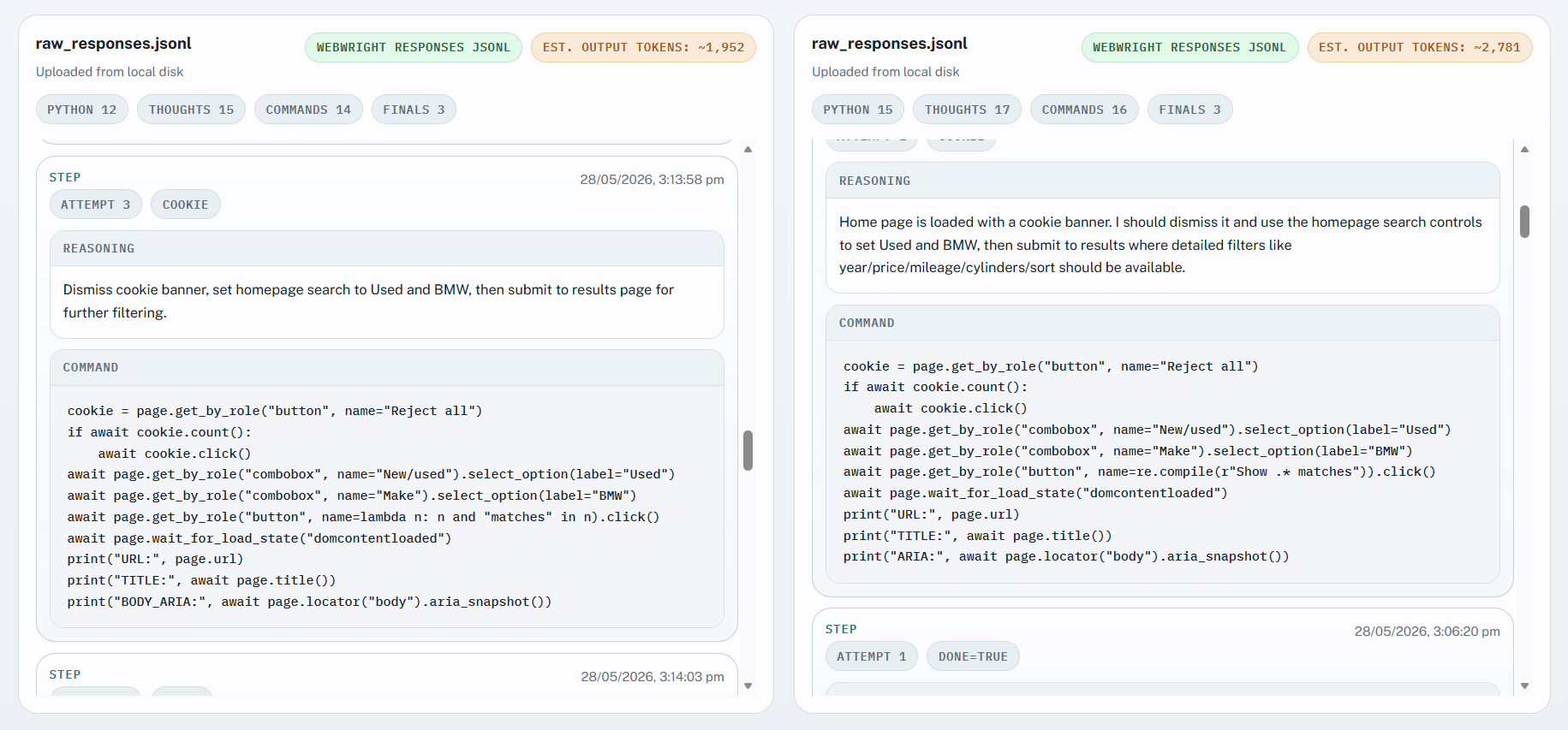
How to use
cd assets/compare_trajectory/
python3 -m http.server
Open the webpage in your browser and upload the Webwright raw_responses.jsonl and attach trajectory.json to view. Then on the other side you can upload your Codex or GitHub Copilot trace.
Obtaining Codex traces:
ls ~/.codex/sessions/2026/MONTH/DAY/SESSION_ID.jsonl
Obtaining GitHub Copilot traces:
/export file session
-> session.md is the uploadable trace
Quick Comparison
"Find the cheapest used 8-cylinder bmw made between 2005-2015 and priced from 25,000 to 50,000 dollars with mileage less than 50,000 miles or less."
| Tokens | Webwright Harness (Local Browser Mode) | Codex Webwright Skill |
|---|---|---|
| Input | 420,433 | 3,271,143 |
| Output | 3,593 | 20,040 |
| Reasoning | 0 | 4,410 |
| Cached | 217,216 | 3,081,3440 |
| Total | 424,026 | 3,291,183 |
Individual runs and results may vary.
Credits
- SWE-agent/mini-swe-agent — design inspiration for the minimal agent loop.
- Playwright — browser automation.
Citation
If you use Webwright in your research or build on it, please cite this repository:
@misc{webwright2026,
  title        = {Webwright: A terminal is all you need for web agents},
  author       = {Lu, Yadong and Xu, Lingrui and Huang, Chao and Awadallah, Ahmed},
  year         = {2026},
  howpublished = {\url{https://github.com/microsoft/Webwright}},
  note         = {GitHub repository}
}
Reviews
No reviews yet. Be the first.
Related
superpowers-symfony
A Symfony-focused toolkit for Claude Code providing TDD (Pest/PHPUnit), Doctrine ORM, API Platform, Messenger, Voters, quality checks (PHP-CS-Fixer/PHPStan), and pragmatic architecture patterns - Docker Compose and Symfony Docker (FrankenPHP) compatible
cc10x
The Loop Engine — harness and loop engineering plugin for Claude Code. Router-kernel orchestration, workflow artifacts, sub-agent delegation, hook enforcement, Test Honesty Gates, fresh-context verification, and memory that persists. 73% leaner than v11, zero quality regression.
embedded-debugger
Embedded debugger workflow for probe-rs targets. Provides a CLI-first skill and optional MCP server for probe discovery, target checks, flashing, memory access, and RTT workflows.
mh install plugins/webwright