openbsp
OpenBSP plugin for Claude Code — WhatsApp channel and API access.
pinned to #25c7c8dupdated last month
Ask your AI client: “install plugins/openbsp”.
Requires the metahub MCP server installed in your client. Set up MCP.
mh install plugins/openbspmetahub onboarded this repo on the author's behalf.
If you own github.com/matiasbattocchia/open-bsp-api on GitHub, claim the listing to take over publishing. Your claim preserves the existing eval history and badges; only the curator label is replaced with verified-publisher on your next publish.
Stars
374
Last commit
last month
Latest release
published
- #agents
- #ai
- #ai-agents
- #deno
- #instagram-api
- #mcp
- #supabase
- #whatsapp-api
Evaluation report
WarningsAutomated checks the publisher passed at publish time — structure, docs, safety, and whether the artifact behaves as claimed.25c7c8d· last month
Kind-specific
31Plugin: manifest fields complete
Plugin: bundled artifacts presentwarn
Couldn't find a skills/ subdir or an MCP server config inside the plugin
A plugin is most useful when it bundles ≥ 1 skill or an MCP server.
Plugin: bundle shape
empty bundle
Plugin: manifest location
manifest at plugin.json
Release history
1- releasecurrent25c7c8dwarnlast month
Contents
OpenBSP API
<strong>Open-source WhatsApp and Instagram Business Platform</strong>
Self-hostable, multi-tenant, AI-agent ready. Built with Deno 🦕 and Postgres 🐘, powered by Supabase ⚡

OpenBSP is designed for both individual businesses and service providers. You can use it to manage your own WhatsApp and Instagram messaging, or leverage its features to become a Meta Business Partner and offer messaging services to other organizations.
User Interface
For a complete web-based interface to manage conversations check out the companion project:
🖥️ OpenBSP UI — A modern, responsive web interface built with React and Tailwind.
https://github.com/user-attachments/assets/1ef30dde-9de1-4f5a-856a-db34ca2e3063
Description
OpenBSP API is a multi-tenant platform that connects to the official WhatsApp and Instagram APIs to receive and send messages, storing them in a Supabase-backed database.
Core features
- 🤝 Meta Business Partner ready: Built to facilitate the transition to an official solution provider.
- 🔗 WhatsApp account Coexistence: Connect existing WhatsApp Business accounts via Embedded Signup.
- 🏢 Multi-tenant architecture: Native support for multiple organizations with isolated environments.
- 🔌 External integration: Seamlessly connect with external services using webhooks and the API.
AI agents
Create lightweight agents or connect to external, more advanced agents using
different protocols like a2a and chat-completions. Lightweight agents can
use built-in tools:
- MCP client
- SQL client
- HTTP client
- Calculator
[!IMPORTANT] This project prioritizes a decoupled architecture between communication and agent logic. Advanced agents built with frameworks like the OpenAI SDK or Google ADK should be deployed as external services.
Media processing
Interpret and extract information from media and document files, including:
- Audio
- Images
- Video
- Other text-based documents (CSV, HTML, TXT, etc.)
Claude Code plugin
The OpenBSP plugin gives Claude Code full API access and optionally bridges
WhatsApp messages in real-time. Claude can query contacts, conversations,
templates, and more via the query tool, and reply to WhatsApp messages via the
reply tool.
Install the plugin:
/plugin marketplace add matiasbattocchia/open-bsp-api
/plugin install openbsp@matiasbattocchia-open-bsp-api
On first run, a browser opens for Google sign-in (same account as the web UI). Then configure allowed contacts for the WhatsApp channel:
/openbsp:config contacts add 5491155551234
No contacts are forwarded until explicitly added (secure by default). API access
works regardless of channel configuration. See
plugin/README.md for full documentation.
MCP server
The mcp Edge Function exposes an MCP server
over SSE, giving agentic access to the WhatsApp API from clients like Claude
Desktop or other agent platforms.
For the hosted version at web.openbsp.dev, the MCP server URL is:
https://nheelwshzbgenpavwhcy.supabase.co/functions/v1/mcp
Authentication uses the Authorization: Bearer <API_KEY> header. Get it from
OpenBSP > Settings > API Keys.
Optionally, Allowed-Contacts and Allowed-Accounts headers restrict which
phone numbers the key can access.
Claude Desktop configuration (claude_desktop_config.json):
{
  "mcpServers": {
    "openbsp": {
      "url": "https://nheelwshzbgenpavwhcy.supabase.co/functions/v1/mcp",
      "headers": {
        "Authorization": "Bearer <API_KEY>"
      }
    }
  }
}
Available tools:
| Tool | Description |
|---|---|
list_accounts | List connected WhatsApp accounts |
list_conversations | Get recent active conversations |
fetch_conversation | Fetch messages and service window status for a contact |
search_contacts | Find contacts by name or phone number |
send_message | Send a text or template message (enforces 24h service window) |
list_templates | List available WhatsApp templates |
fetch_template | Fetch details of a specific template |
Demo
A managed instance is available at web.openbsp.dev — same codebase as this repo, running on Supabase. Sign up with a Google or GitHub account.
Quotas
| Resource | Included |
|---|---|
| Messages | 5,000 / month |
| Conversations | Unlimited |
| Storage | 1 GB |
| AI Credits | $1.00 (one-time) |
AI Credits apply only when agents use the built-in LLM gateway. Configuring an
agent with your own provider API key (AgentExtra.api_key) bypasses credit
consumption.
Data portability
Your data is yours. You can export your organization's data from the hosted instance and load it into a self-hosted deployment — both run the same schema, and all data is scoped by organization with no cross-org dependencies.
Data deletion
Deleting an organization is immediate and irreversible: all of its database rows
(contacts, conversations, messages, agents, addresses, billing) are removed in a
single cascading delete. Media files in Storage have no foreign key to the
organization, so they are not deleted in that transaction — instead an hourly
background sweep (storage-gc) removes the files of any organization that no
longer exists. Expect attachments to linger for up to an hour after deletion;
they are inaccessible in the meantime (Storage RLS denies reads for orgs you
don't belong to).
Migrating from another platform
If you're moving an existing WhatsApp integration to OpenBSP, two guides cover the most common starting points:
- Migrating from Twilio — for teams on Twilio's Programmable Messaging API. Mostly a direct port: same Meta Cloud API underneath, different BSP. Templates need to be re-registered against your own WABA; everything else maps one-to-one.
- Migrating from whatsapp-web.js — for teams using the unofficial Puppeteer-based library. This is a platform change, not just a code change: you move from a personal WhatsApp account to a registered WhatsApp Business Account, and some features (group management, polls, communities, status) don't exist on the Cloud API at all. Read the compatibility matrix before deciding.
Both guides use HTTP + JSON examples and assume no prior OpenBSP knowledge.
Self-host deployment
[!NOTE] Deploy your own instance in under 15 minutes — no local environment required.
- Fork this repo (1 min)
- Create a Supabase project (5 min)
- Connect the project to your fork via the Supabase GitHub Integration (5 min)
You are live! 🚀 Pushes to your default branch will automatically deploy database migrations and Edge Functions.
Option A: deploy via Supabase GitHub Integration
Connection
- Navigate to your Supabase project's Dashboard
- Go to Project Settings > Integrations
- Under GitHub Integration, click Authorize GitHub
- On the GitHub authorization page, click Authorize Supabase
- Back on the Integrations page, choose your forked open-bsp-api repository
- Set the Working directory to
. - Enable Deploy to production
- Set the Production branch to
main - Click Enable integration
Vault secrets
Create the secrets at Supabase Dashboard > Integrations > Vault > Secrets > Add new secret
- edge_functions_url:
https://{SUPABASE_PROJECT_ID}.supabase.co/functions/v1 - edge_functions_token: the
SUPABASE_SERVICE_ROLE_KEY
Release
From GitHub > ➕ (the button near the
<> Codebutton) > Create new file > Name it something like.trigger_deploy> Commit changes... > Commit directly to themainbranch > Commit changes
A one-time push to your fork is required to trigger the very first deploy. After that it is no longer needed — every time you sync your fork with this repository, the deploy happens automatically.
Please upvote this request to help Supabase improve this process.
Option B: deploy via GitHub Actions
The repository also ships with a Release GitHub Actions workflow that performs
the same deployment from inside CI. The workflow is set to workflow_dispatch:
only — it does not run on push. This path is optional and useful if you
mirror this repo to another host (e.g. GitLab) or prefer keeping deployments
self-contained in GitHub Actions instead of relying on Supabase's integration.
Secrets
Create the secrets at GitHub > Repository > Settings ⚙️ > Secrets and variables *️⃣ > Actions > Secrets
<!-- `https://github.com/{github_account}/open-bsp-api/settings/secrets/actions` -->
- SUPABASE_ACCESS_TOKEN: A personal access token
- SUPABASE_DB_PASSWORD <!-- Get it at Supabase > Project > Database > Settings > Database password `https://supabase.com/dashboard/project/{project_id}/database/settings` -->
- SUPABASE_SERVICE_ROLE_KEY: you can use a secret key instead of the legacy service role key <!-- Get it at Supabase > Project > Project Settings > API keys > API Keys > Secret keys `https://supabase.com/dashboard/project/{project_id}/settings/api-keys/new` -->
Variables
Create the variables at GitHub > Repository > Settings ⚙️ > Secrets and variables *️⃣ > Actions > Variables
<!-- `https://github.com/{github_account}/open-bsp-api/settings/variables/actions` -->
- SUPABASE_PROJECT_ID <!-- the `{project_id}` in `https://supabase.com/dashboard/project/{project_id}` -->
- SUPABASE_SESSION_POOLER_HOST: it is like
aws-0-us-east-1.pooler.supabase.com<!-- Found at Supabase > Project > Connect 🔌 > Session pooler > View parameters > Host `https://supabase.com/dashboard/project/{project_id}/database/schemas?showConnect=true` -->
Release
Go to GitHub > Repository > Actions ▶️ > Release
<!-- `https://github.com/{github_account}/open-bsp-api/actions/workflows/release.yml` -->
- Click Run workflow
WhatsApp integration
To connect your OpenBSP project to the WhatsApp API, you'll need to setup a Meta App with the WhatsApp product and configure the following Edge Functions secrets. You can set these up in two ways:
- Direct configuration: Add them directly in your Supabase dashboard at Supabase > Project > Edge Functions > Secrets. <!-- `https://supabase.com/dashboard/project/{project_id}/functions/secrets` -->
- GitHub Actions: Set them as GitHub Actions secrets in your repository settings and re-run the Release action to automatically deploy them.
Secrets
- META_SYSTEM_USER_ID
- META_SYSTEM_USER_ACCESS_TOKEN
- META_APP_ID
- META_APP_SECRET
- WHATSAPP_VERIFY_TOKEN
Follow these steps to obtain the required credentials.
Step 0: Overview
There is quiet a Meta nomenclature of entities that you might want to get in order to not to get lost in the platform.
- Business profile - This is the top-level entity, represents a business. Has users and assets.
- User - Real or system users. System users can have access tokens. Users belong to a business portfolio and can have assigned assets.
- Asset - WhatsApp accounts, Instagram accounts, Meta apps, among others. Assets belong to a business portfolio and are assigned to users.
- App - An asset that integrates Meta products such as the WhatsApp Cloud API.
- WhatsApp Business Account (WABA) - A WhatsApp account asset, can have many phone numbers.
- Phone number - A registered phone number within the WhatsApp Cloud API. Belongs to a WABA.
For more details, refer to Cloud API overview.
Step 1: Create a Meta app (skip if you already have one)
- Navigate to My Apps
- Click Create App
- Select the following options:
- Use case: Other
- App type: Business
- Add the WhatsApp product to your app
- Click Add API
- Disregard the screen that appears next and proceed to the next step
Step 2: Create a system user
- Get into the Meta Business Suite. If you have multiple portfolios, select the one associated with your app
- Go to Settings > Users > System users <!-- `https://business.facebook.com/latest/settings/system_users` -->
- Add an admin system user
- Copy the ID → META_SYSTEM_USER_ID
- Assign your app to the user with full control permissions
- Generate a token with these permissions:
business_managementwhatsapp_business_messagingwhatsapp_business_management
- Copy the Access Token → META_SYSTEM_USER_ACCESS_TOKEN
For detailed instructions on system user setup, refer to the WhatsApp Business Management API documentation.
Step 3: Get the app credentials
- Navigate to My Apps > App Dashboard <!-- `https://developers.facebook.com/apps/{app_id}` -->
- Go to App settings > Basic <!-- `https://developers.facebook.com/apps/{app_id}/settings/basic` -->
- Copy the following values:
- App ID → META_APP_ID
- App secret → META_APP_SECRET
Multiple Meta apps are supported by separating values with
|(pipe) characters. For example:META_APP_ID=app_id_1|app_id_2andMETA_APP_SECRET=app_secret_1|app_secret_2.
Step 4: Configure the WhatsApp Business Account webhook
Part A
- Within the App Dashboard
- Go to WhatsApp > Configuration <!-- `https://developers.facebook.com/apps/{app_id}/whatsapp-business/wa-settings` -->
- Set the Callback URL to:
https://{SUPABASE_PROJECT_ID}.supabase.co/functions/v1/whatsapp-webhook - Choose a secure token for WHATSAPP_VERIFY_TOKEN → Set it as the Verify token, but do not click Verify and save yet!
- Ensure your Edge Functions environment variables are up-to-date
- If you configured secrets directly in your Supabase dashboard, no further action is needed at this point
- If you set secrets via GitHub Actions, re-run the Release action now to deploy them to your Edge Functions
- Click Verify and save
- Disregard the screen that appears next and proceed to the next step
Multiple Meta apps are supported by appending the query param
?app_id={META_APP_ID}to the callback URL. For example:https://{SUPABASE_PROJECT_ID}.supabase.co/functions/v1/whatsapp-webhook?app_id=app_id_2.
Part B
- Within the App Dashboard
- Go to WhatsApp > Configuration <!-- `https://developers.facebook.com/apps/{app_id}/whatsapp-business/wa-settings` -->
- Subscribe to the following Webhook fields:
account_updatemessageshistorysmb_app_state_syncsmb_message_echoesuser_id_update
Optionally, test the configuration so far. In the
<!-- `https://supabase.com/dashboard/project/{project_id}/functions/whatsapp-webhook/logs` -->messagessubscription section, click Test. You should see the request in Supabase > Project > Edge Functions > Functions > whatsapp-webhook > Logs.You might observe an error in the logs. This is an expected outcome at this stage; the simple fact that a log entry appears confirms that the webhook is successfully receiving events.
Step 5: Add a phone number
If you decide to add the test number,
- Within the App Dashboard
- Go to WhatsApp > API Setup <!-- `https://developers.facebook.com/apps/{app_id}/whatsapp-business/wa-dev-console` -->
- Click Generate access token (you can't use the one you got from step 2 here)
- Copy these values:
- Phone number ID
- WhatsApp Business Account ID
- Select a recipient phone number
- Send messages with the API > Send message
The test number doesn't seem to fully activate to receive messages unless you send a test message at least once.
In order to add a production number,
- Click Add phone number
- Follow the flow
- Navigate to WhatsApp Manager
- Go to Account tools > Phone numbers <!-- `https://business.facebook.com/latest/whatsapp_manager/phone_numbers` -->
- Copy these values:
- Phone number ID
- WhatsApp Business Account ID
For any number you add
Create an organization if you haven't done that already.
insert into public.organizations (name, extra) values
  ('Default', '{ "response_delay_seconds": 0 }')
;
Note the organization ID.
Register the phone number with your organization in the system.
insert into public.organizations_addresses (
    organization_id,
    service,
    address,
    status,
    extra
  ) values (
    '<Organization ID>',                     -- ID from the previous step
    'whatsapp',
    '<Phone number ID>',                     -- Meta's phone_number_id (NOT the phone number)
    'connected',                             -- 'connected' | 'disconnected'
    jsonb_build_object(
      'waba_id',       '<WhatsApp Business Account ID>', -- WhatsApp Business Account ID
      'phone_number',  '<Phone number>',      -- bare E.164 digits, no '+', no spaces
      'verified_name', 'Acme Inc.',           -- Optional: display name shown to recipients
      'business_id',   '<Meta Business Portfolio ID>', -- Optional: Meta Business Portfolio ID (parent of the WABA)
      'flow_type',     'new_phone_number',    -- 'new_phone_number' | 'existing_phone_number'
      'access_token',  '<System User Token>'  -- Optional: per-WABA token; if not provided, the system user token is used
    )
  );
Instagram integration
To connect your OpenBSP project to the Instagram API, you'll need to setup a Meta App with the Instagram product and configure the following Edge Functions secrets.
Please go through the WhatsApp integration step 1 if you haven't got a Meta App yet.
[!IMPORTANT] There are two official ways of integrating Instagram:
- Instagram login
- Facebook login OpenBSP uses Instagram login.
Secrets
- INSTAGRAM_APP_ID
- INSTAGRAM_APP_SECRET
- INSTAGRAM_VERIFY_TOKEN
Configure the Instagram app
- Within the App Dashboard
- Go to Instagram > API setup with Instagram login
- Copy the following values:
- Instagram app ID → INSTAGRAM_APP_ID
- Instagram app secret → INSTAGRAM_APP_SECRET
Configure webhooks
- Set the Callback URL to:
https://{SUPABASE_PROJECT_ID}.supabase.co/functions/v1/instagram-webhook - Choose a secure token for INSTAGRAM_VERIFY_TOKEN → Set it as the Verify token, but do not click Verify and save yet!
- Ensure your Edge Functions environment variables are up-to-date
- If you configured secrets directly in your Supabase dashboard, no further action is needed at this point
- If you set secrets via GitHub Actions, re-run the Release action now to deploy them to your Edge Functions
- Click Verify and save
Set up Instagram business login
- Click Business login settings
- Set the following fields:
- OAuth redirect URIs:
{PUBLIC_URL}/oauth/instagramand{PUBLIC_URL}/onboard-instagram/callback - Deauthorize callback URL:
https://{SUPABASE_PROJECT_ID}.supabase.co/functions/v1/instagram-management/deauthorize - Data deletion request URL:
https://{SUPABASE_PROJECT_ID}.supabase.co/functions/v1/instagram-management/data-deletion
- OAuth redirect URIs:
- Click Save
Note that
PUBLIC_URLis your app/UI public domain. For example, mine is https://web.openbsp.dev.
App review
[!NOTE] You can skip this step if you're a direct developer who only builds for your own WhatsApp/Instagram businesses and don't plan to create solutions for clients.
- App review > Permissions and Features
- Request advanced access for permissions
- WhatsApp
whatsapp_business_managementwhatsapp_business_messaging
- Instagram
instagram_business_basicinstagram_business_manage_messages
- WhatsApp
- App review > Requests > Click Next
Allowed usage
whatsapp_business_management
Description
We request this permission to read and/or manage WhatsApp business assets we own or have been granted access to by other businesses.
Screen recording
https://github.com/user-attachments/assets/dd064fd6-b06c-4fff-986e-578269fdf6d2
whatsapp_business_messaging
Description
We request this permission to view, manage and respond to messages.
Screen recording
https://github.com/user-attachments/assets/7e0394c8-0d08-4048-8a02-ca215c365a49
instagram_business_basic
Description
We are requesting instagram_business_basic permission as a dependent permission for instagram_business_manage_messages.
Screen recording
https://github.com/user-attachments/assets/bc7a0ac7-7522-4c29-abc4-fe638fe7dc38
instagram_business_manage_messages
Description
We request this permission to view, manage and respond to messages.
Screen recording
https://github.com/user-attachments/assets/d86cf719-250d-4e3d-8c15-873daa6707d6
Architecture
New to Supabase? In one sentence: it's a hosted Postgres platform that auto-exposes your tables over a REST and realtime API, runs Deno-based Edge Functions for server-side logic, and handles auth and file storage on top. OpenBSP leans heavily on those primitives — most business logic lives as SQL triggers and Edge Functions, and clients (the web UI, the Claude Code plugin, custom integrations) talk to Postgres directly through a Supabase client library rather than through a separate backend layer.
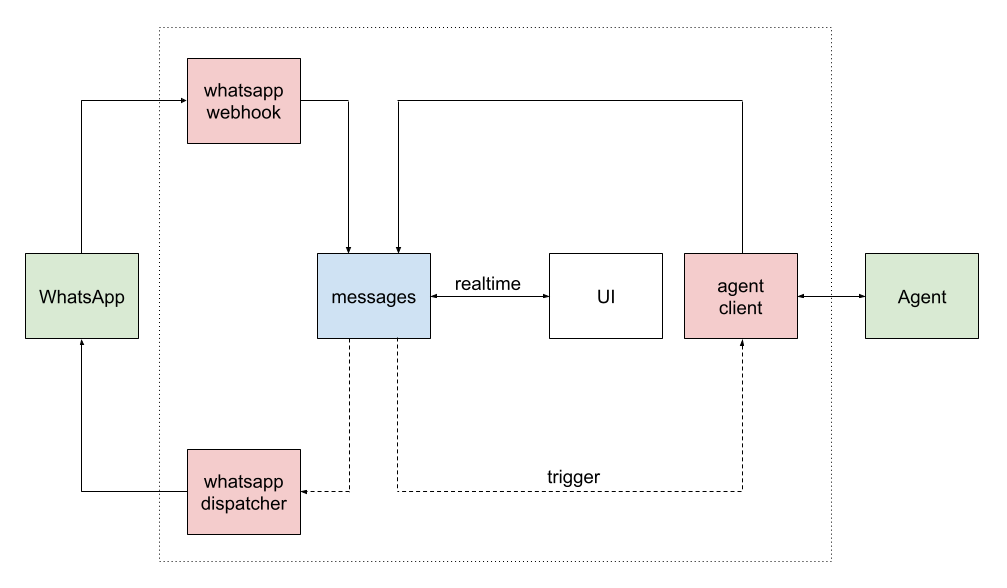
In the image, green boxes are external services, red are Edge Functions and blue, database tables. White boxes are clients.
The system uses a reactive, function-based architecture:
- A request from the WhatsApp API is received by the
whatsapp-webhookfunction. whatsapp-webhookprocesses the incoming message and stores it in themessagestable.- An insert trigger on the
messagestable forwards the message to theagent-clientfunction (incoming trigger). agent-clientbuilds the conversation context and sends a request to an agent API using the Chat Completions format.agent-clientwaits for the agent's response and saves it back to themessagestable.- An outgoing trigger on the
messagestable forwards the new message to thewhatsapp-dispatcherfunction. whatsapp-dispatcherprocesses the message and sends a request to the WhatsApp API to deliver it.
This event-driven flow ensures that each component is decoupled and scalable.
Edge Functions
whatsapp-webhook: Handles incoming webhook events from the WhatsApp Cloud API.whatsapp-dispatcher: Sends outbound messages to the WhatsApp Cloud API.whatsapp-manager: Integrates with the WhatsApp Business Management API for business and phone number management.
Agent
agent-client: Orchestrates agent interactions, builds conversation context, and communicates with external agent APIs over Chat Completions or A2A protocols.
Database models
- users: Registered user in the application (mapped to Supabase Auth).
- organizations: Tenant entity; holds organization metadata.
- organizations_addresses: An organization's connected addresses per service
— e.g. a WhatsApp phone number. Belongs to an
organization. - contacts: People associated with an
organization— the address-book entry that groups one or more addresses under a name. - contacts_addresses: Addresses a contact can be reached at (e.g. a phone number for WhatsApp). An address can exist unlinked to any contact, so addresses and contacts have independent lifecycles — the sync triggers in this table manage linking/unlinking and orphan cleanup.
- conversations: A conversation between an
organization_addressand acontact_address(orgroup_address) for a given service; belongs to anorganization. - messages: Messages within a
conversation; carry direction, type, payload, status, and timestamps. - agents: Human or AI agents for an
organization; optionally linked to an authuser. - api_keys: API access keys scoped to an
organization. - webhooks: Outbound webhook subscriptions per
organization. - quick_replies: Reusable response snippets scoped to an
organization. - logs: Application-level log entries (errors, warnings) written by Edge Functions.
Configuration
Organizations
export type OrganizationExtra = {
  response_delay_seconds?: number; // default: 3
  welcome_message?: string;
  authorized_contacts_only?: boolean;
  default_agent_id?: string;
  media_preprocessing?: {
    mode?: "active" | "inactive";
    model?: "gemini-2.5-pro" | "gemini-2.5-flash"; // default: gemini-2.5-flash
    api_key: string; // default GOOGLE_API_KEY env var
    language?: string;
    extra_prompt?: string;
  };
  error_messages_direction?: "internal" | "outgoing";
};
Agents
The spirit of this project has been to equiparate the experience of human and AI agents.
Human
Roles and privileges
- Owner — full control: manage organizations, manage integrations, invite/remove anyone
- Admin — operational control: manage conversations, create AI agents
- Member — standard usage: create conversations, use the chat features
AI
export type AgentExtra = {
  mode?: "active" | "draft" | "inactive";
  description?: string;
  api_url?: "openai" | "anthropic" | "google" | "groq" | string; // default: openai
  api_key?: string; // default: provider env var, i.e. OPENAI_API_KEY
  model?: string; // default: gpt-5-mini
  // TODO: Add responses (openai), messages (anthropic), generate-content (gemini).
  protocol?: "chat_completions" | "a2a"; // default: chat_completions
  assistant_id?: string;
  max_messages?: number;
  temperature?: number;
  max_tokens?: number;
  thinking?: "minimal" | "low" | "medium" | "high";
  instructions?: string;
  send_inline_files_up_to_size_mb?: number;
  tools?: ToolConfig[];
};
Local development
Requires Node 🐢 and Docker 🐋.
Database
npx supabase start
After editing the schema files, generate a migration
npx supabase db diff -f <migration_name>
Apply the migration to the local database
npx supabase migration up
Finally, update the types
npx supabase gen types typescript --local > supabase/functions/_shared/db_types.ts
Edge Functions
npx supabase functions serve
REST API docs
Fetch the OpenAPI spec from PostgREST (requires the service role key):
curl "https://<project-id>.supabase.co/rest/v1/" -H "apikey: <service_role_key>" > openapi.json
Related open-source projects
Official (Meta Cloud API)
Connect through Meta's official WhatsApp Business Cloud API. Compliant with WhatsApp Business policies, production-ready, requires Meta verification.
- EvolutionAPI/evolution-api — REST API for WhatsApp integration, supports Cloud API.
- shridarpatil/whatomate — open-source WhatsApp integration on Cloud API.
Unofficial (WhatsApp Web)
Reverse-engineered WhatsApp Web protocols. Work without Meta approval and support personal accounts, but at risk of bans and not suited for high-volume production.
- wwebjs/whatsapp-web.js — Node.js client library using Puppeteer.
- WhiskeySockets/Baileys — TypeScript/JavaScript socket-based library.
- rmyndharis/OpenWA — self-hosted WhatsApp API gateway.
- devlikeapro/waha — HTTP/REST API with three engines (Web, Node, Go).
- tulir/whatsmeow — Go library for the WhatsApp Web multidevice API.
- open-wa/wa-automate-nodejs — Node.js chatbot toolkit.
OpenBSP is in the first category. If you need to talk to personal accounts, work without Meta verification, or prefer a library/SDK to a platform, the projects in the second category are better fits.
Acknowledgments
- @diegoparma — for years of feedback, design input, and being one of the project's earliest power users.
- @rolox05 — first UI, PoC and kickstart partner.
Community
Questions, ideas, or feedback? Join our WhatsApp Community or open an issue. We'd love to hear from you.
Reviews
No reviews yet. Be the first.
Related
before-you-build
Production-ready workflow orchestration with 91 marketplace plugins, 199 local specialized agents, and 162 local skills - optimized for granular installation and minimal token usage
youtube-transcribe-skill
Extract subtitles/transcripts from YouTube videos via CLI or browser automation
explanatory-output-style
Adds educational insights about implementation choices and codebase patterns (mimics the deprecated Explanatory output style)
mh install plugins/openbsp