lattice
Composable AI skills framework covering the full software delivery lifecycle — design, architecture, implementation, testing, and review.
pinned to #75b7e07updated 3 weeks ago
Ask your AI client: “install plugins/lattice”.
Requires the metahub MCP server installed in your client. Set up MCP.
mh install plugins/latticemetahub onboarded this repo on the author's behalf.
If you own github.com/techygarg/lattice on GitHub, claim the listing to take over publishing. Your claim preserves the existing eval history and badges; only the curator label is replaced with verified-publisher on your next publish.
Stars
156
Last commit
3 weeks ago
Latest release
published
- #agent
- #agent-memory
- #agent-skills
- #agentskills
- #claude
- #claude-code
- #claude-code-plugin
- #claude-skills
- #clean-architecture
- #clean-code
- #codex
- #codex-plugin
- #codex-skills
- #context-engineering
- #ddd
- #engineering-enablement
- #lattice
- #sdlc-workflow
- #tdd
Evaluation report
WarningsAutomated checks the publisher passed at publish time — structure, docs, safety, and whether the artifact behaves as claimed.75b7e07· 3 weeks ago
Kind-specific
31Plugin: manifest fields complete
Plugin: bundled artifacts presentwarn
Couldn't find a skills/ subdir or an MCP server config inside the plugin
A plugin is most useful when it bundles ≥ 1 skill or an MCP server.
Plugin: bundle shape
empty bundle
Plugin: manifest location
manifest at .claude-plugin/plugin.json (modern convention)
Release history
1- releasecurrent75b7e07warn3 weeks ago
Contents
Composable AI skills that teach assistants structured thinking — design-first, context-aware, and architecture-guided.
What is Lattice?
AI coding assistants jump straight to code, silently make design decisions, forget constraints mid-conversation, and produce output nobody reviewed against real standards. Lattice fixes this with composable skills in three tiers — atoms, molecules, refiners — that embed battle-tested engineering disciplines plus a living context layer that accumulates your project's standards, decisions, and review insights across every feature cycle.
Three principles guided Lattice's design:
- Skills over prompts — versioned, team-owned skill files in the repository beat personal prompts on one developer's machine
- Composability over monoliths — small single-purpose skills that combine into workflows beat one instruction document that tries to cover everything
- Living context over static config — the
.lattice/folder grows smarter with every feature cycle rather than being configured once and forgotten
The Three Tiers
| Tier | Purpose |
|---|---|
| Atoms | Single-principle guardrails — clean code, architecture, DDD, secure coding, test quality, design-first, and more |
| Molecules | Multi-step workflows that compose atoms — design, implement, refactor, fix, review |
| Refiners | Guided interviews that produce project-specific standards, customizing how atoms behave for your team |
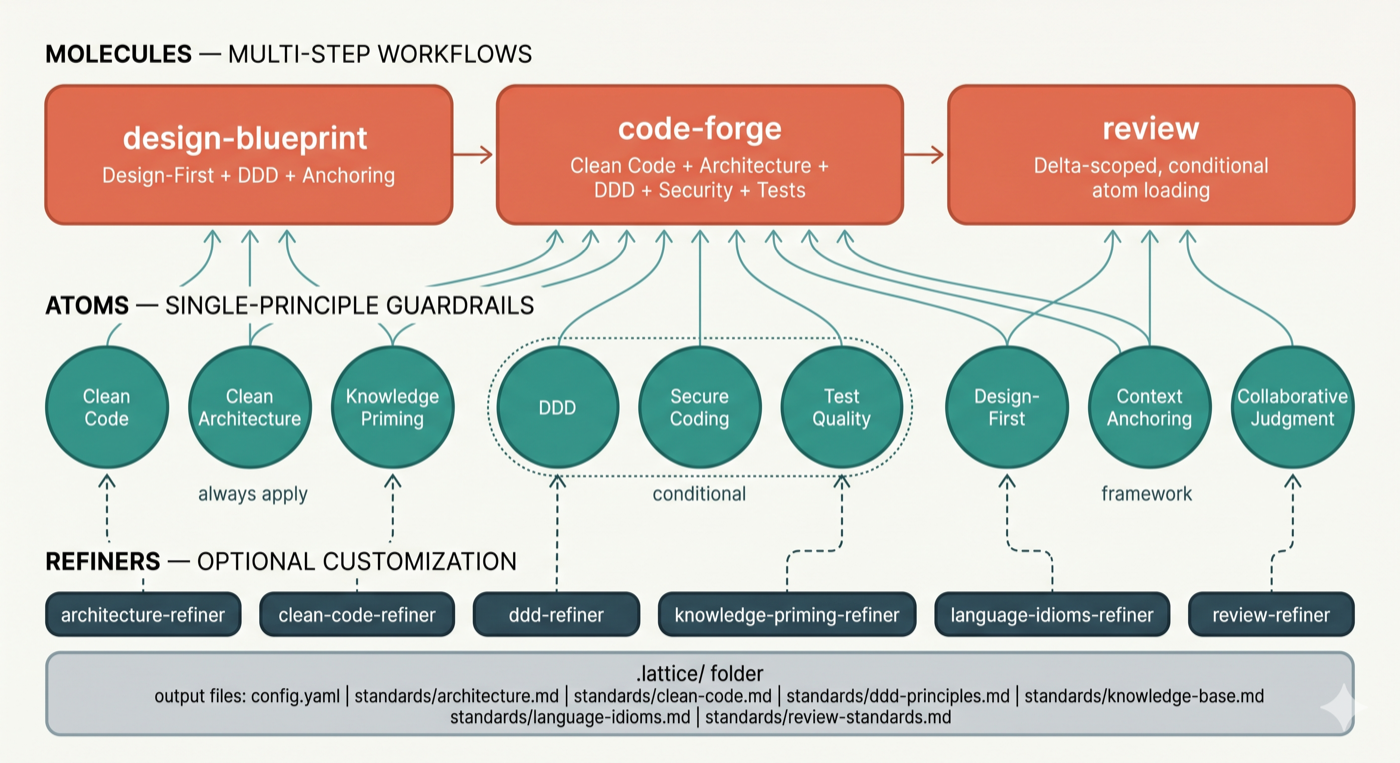
See How It Works for the full skill inventory and mechanics.
The Pipeline
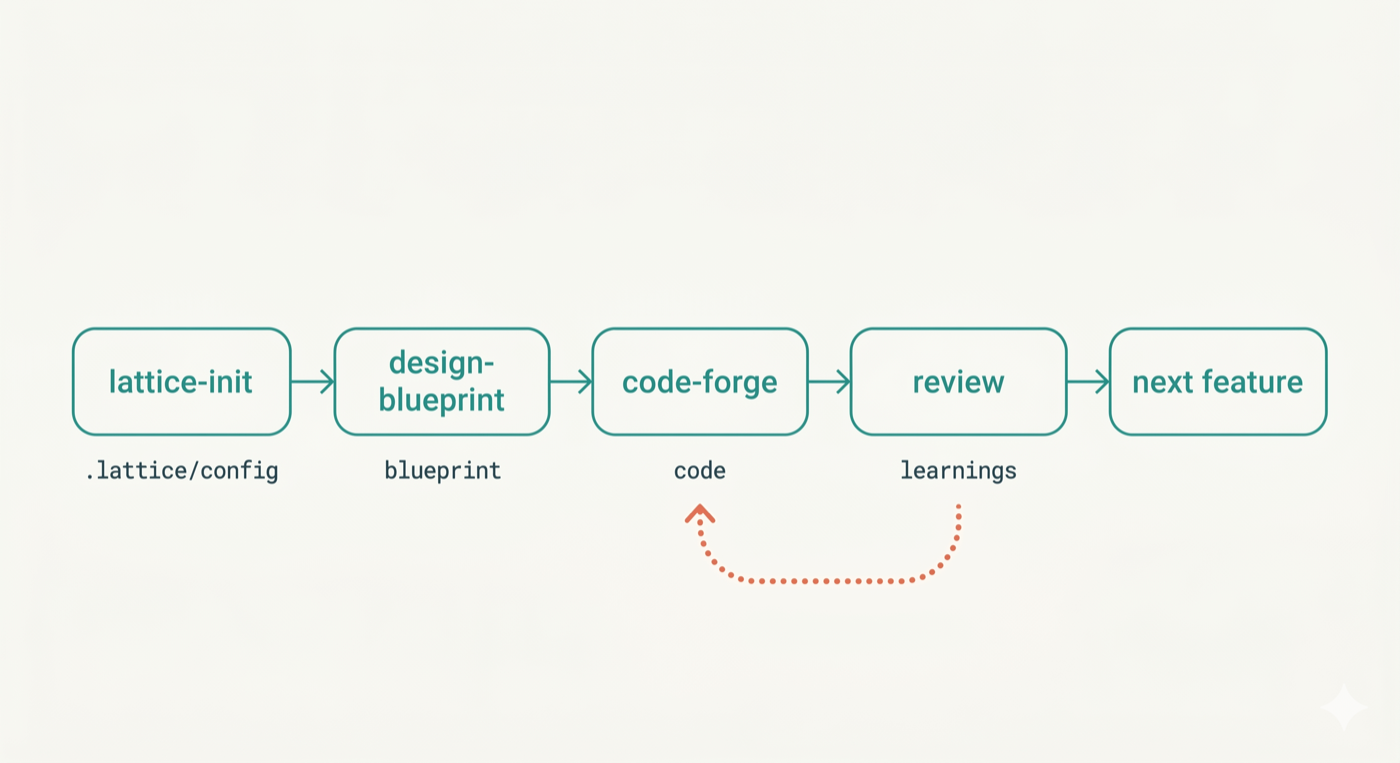
Skills form a delivery lifecycle: requirement-forge → design-blueprint → code-forge → review, with refactor-safely and bug-fix covering structural and defect-driven work. requirement-forge starts the pipeline — it acts as a senior PM + BA pair to produce structured feature specs in .lattice/requirements/ that feed directly into design-blueprint. For teams with existing codebases, architecture-compass sits before the pipeline — it scans the repository, runs a structured interview, and produces an agreed architectural direction that orients the team before any code changes begin. Each stage consumes and produces artifacts in .lattice/, growing the living context layer.
Getting Started
-
Install Lattice — choose the path that fits your setup:
Option A — Claude Code plugin (also works in Cursor — reads Claude Code skills automatically)
/plugins marketplace add techygarg/lattice
/plugins install lattice
/reload-plugins
Option B — Codex-compatible plugin package
codex plugin marketplace add techygarg/lattice
codex plugin add lattice@lattice
codex plugin list | rg -i lattice
The Codex plugin package lives in
plugins/lattice/and is registered by.agents/plugins/marketplace.json. It contains the same 27 skills flattened for Codex discovery.This duplication currently to support codex. In future, we may find a better approach as tools evolves.
Option C — Clone and install locally (any AI tool)
git clone https://github.com/techygarg/lattice.git
cd lattice
./tools/install.sh /absolute/path/to/your/skills/folder
Pass the skills directory for your tool:
~/.claude/skills/for Claude Code,.cursor/skills/for Cursor, or any tool's skills folder.Try it immediately. The repo includes
sample/— a realistic .NET 8 User Service spec with requirements, domain concepts, and constraints already written. Copy thesample/folder contents into any empty directory and follow the steps below. -
Run
/lattice-initin your AI tool's chat — scans the project, suggests refiners in priority order, creates.lattice/config.yaml. All skill commands (/lattice-init,/requirement-forge,/design-blueprint,/code-forge, etc.) are typed in the AI chat, not the terminal. -
Spec (optional but recommended) —
/requirement-forgeacts as a senior PM + BA pair to define epics and feature specs before any design begins. Accepts existing PRDs, feature lists, or a verbal description. Produces.lattice/requirements/as direct input to design-blueprint. -
Design —
/design-blueprintwalks through five progressive design levels before any code is written. -
Implement —
/code-forgegenerates implementation from the approved blueprint, applying all quality atoms. -
Review —
/reviewaudits the change and persists insights into.lattice/for the next cycle.
Learn More
- Origin Story — why Lattice exists, how five collaboration patterns became an installable framework, and the design philosophy behind it
- How It Works — full skill inventory, composability mechanics, atoms/molecules/refiners in depth, the pipeline
- Practical Guide — scenario-driven Q&A: getting started, customization, workflow, transformation, team usage, troubleshooting
- Architecture Compass — the architectural thinking partner: why it exists, what to expect, and how a session works
- Configuration Reference — every
.lattice/config.yamlkey documented - Framework Intelligence — verification passes, feedback loops, AI compliance techniques
- Collaborative Judgment — why AI should ask on genuine judgment calls or missing/conflicting facts and how it works at runtime
- The Article Series — the five collaboration patterns Lattice operationalizes (martinfowler.com)
Dev Skills
Helper skills for creating and maintaining Lattice itself — see dev-skills/.
Star History
[
](https://www.star-history.com/?repos=techygarg%2Flattice&type=date&legend=top-left)
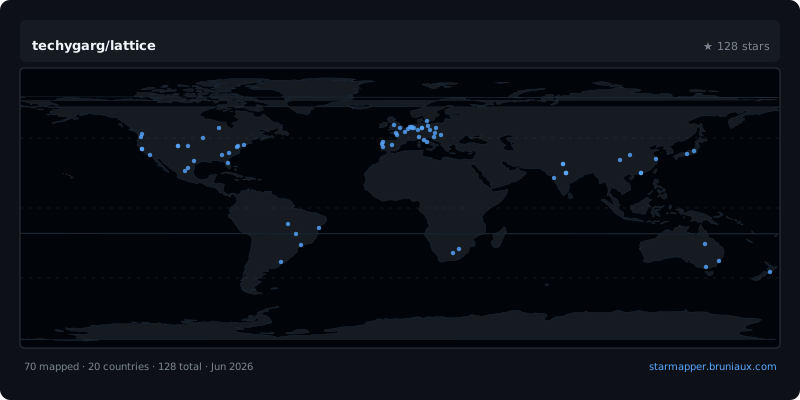
StarMapper
[
](https://starmapper.bruniaux.com/techygarg/lattice)
License
MIT
Reviews
No reviews yet. Be the first.
Related
superloopy
Lightweight loop harness with strict evidence gates — Claude Code edition.
claude-magic-compact
Lossless context compression for Claude Code.
manifest-dev-tools
Tools for working with prompts and PRs alongside the manifest workflow. Collaborative PR walkthroughs, autonomous PR review with per-comment verification, author-side PR babysitting via manifest-dev, gap-calibrated prompt engineering, cross-boundary context handoff, and incremental teaching for session work.
mh install plugins/lattice