design-system-ops
Staff-level design system auditing, governance, documentation, validation, and communication — 40 skills, 4 agents, and 12 knowledge notes for the full design system lifecycle
pinned to #a4b11efupdated 3 weeks ago
Ask your AI client: “install plugins/design-system-ops”.
Requires the metahub MCP server installed in your client. Set up MCP.
mh install plugins/design-system-opsmetahub onboarded this repo on the author's behalf.
If you own github.com/murphytrueman/design-system-ops on GitHub, claim the listing to take over publishing. Your claim preserves the existing eval history and badges; only the curator label is replaced with verified-publisher on your next publish.
Stars
106
Last commit
3 weeks ago
Latest release
published
- #claude-code
- #claude-code-plugin
- #design-system
- #design-systems
- #design-tokens
- #figma
- #skills
What's bundled
Items extracted from this plugin's manifest + directory tree.
Skills (40)
skills/accessibility-per-componentRun an accessibility audit on a specific design system component. Trigger when someone says: accessibility check, a11y audit, WCAG compliance, is this accessible, check accessibility, does this mee…skills/adoption-reportProduce a design system adoption report separating coverage from actual adoption, with trend direction and risk flags. Trigger when someone says: adoption report, how much is the system being used,…skills/ai-component-descriptionGenerate AI-optimised text descriptions for components, formatted for Figma's MCP server and LLM consumption. This produces prose descriptions in a six-section format (purpose, props, anti-patterns…skills/backlog-generatorTransform audit findings into sprint-ready work items with effort estimates, acceptance criteria, and stakeholder-friendly rationale. This converts existing findings into tickets, NOT the process f…skills/change-communicationProduce a communication package for a design system change — release notes, migration guide, and team announcement. This produces communication artefacts for changes that have already been decided,…skills/cicd-integrationGenerate CI/CD pipeline configurations that automate design system quality checks — token validation, component linting, visual regression, accessibility scanning, and release gating. Produces read…skills/codebase-indexGenerate a pre-computed component index from a design system codebase — YAML infrastructure files containing a component inventory, relationship graph, and summary statistics that AI agents and MCP…skills/codemod-generatorGenerate codemods (automated code transformation scripts) for design system migrations — token renames, component API changes, prop deprecations, and import path updates. Produces ready-to-run jsco…
Commands (8)
/cicd-integrationRun the cicd-integration skill to generate a CI/CD pipeline configuration./codemod-generatorRun the codemod-generator skill to produce a migration codemod./component-auditRun the component-audit skill against the user's design system component library./describe-componentRun the ai-component-description skill to generate a structured, machine-readable description for a design system component./docs-coverageRun the docs-coverage skill against the user's design system./drift-checkRun the drift-detection skill to identify where consuming teams are diverging from the design system./full-diagnosticRun the full system diagnostic — a comprehensive health sweep that chains six audit skills (plus conditional theme and Figma audits) into a unified diagnostic report./governance-reviewRun the governance review — a quarterly assessment that produces an internal review, adoption analysis, drift summary, and stakeholder-ready brief.
Evaluation report
WarningsAutomated checks the publisher passed at publish time — structure, docs, safety, and whether the artifact behaves as claimed.a4b11ef· 3 weeks ago
Documentation
41Description quality
24 words · 175 chars — "Staff-level design system auditing, governance, documentation, validation, and c…"
README is present and substantial
9,332 chars · 15 sections · 2 code blocks
Tags / topics declared
7 total — claude-code, claude-code-plugin, design-system, design-systems, design-tokens, figma (+1)
README has usage / example sectionswarn
README has no Usage / Example / Quick start / Installation heading at any level
Add a `# Usage`, `## Quick start`, or similar section so end users can copy/paste a working invocation. Code blocks alone work too if there are several.
Homepage / docs URL declared
https://designsystemops.com
Release history
1- releasecurrenta4b11efwarn3 weeks ago
Contents
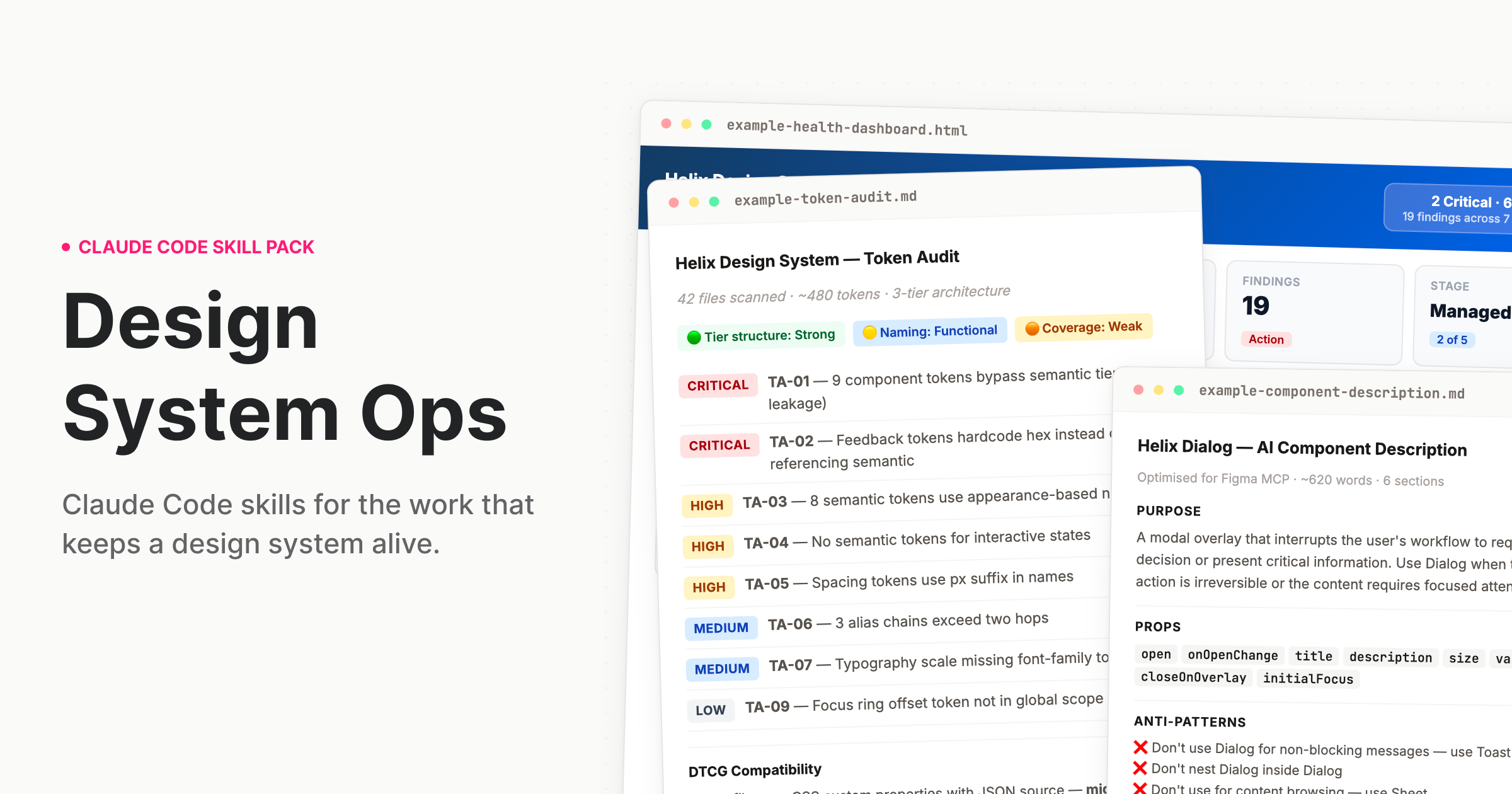
Claude Code skills for the work that keeps a design system alive.
The work nobody built AI for
Design systems drift. Tokens go stale. Components fall out of spec. Governance documentation gets written once and never updated. The deprecation plan lives in someone's head. The stakeholder brief gets thrown together the night before quarterly review. There are great AI tools for the designer who uses a design system. But the team running it? That work never had proper tooling – until now.
What this is
A skill pack for Claude Code and Cowork that teaches Claude how to do design systems work the way a staff-level practitioner would — with structured processes, expert frameworks, and output calibrated to the actual complexity of what you're dealing with.
When you ask Claude to audit your tokens, it doesn't give you generic advice. It reads your actual token files, identifies tier leakage, flags naming violations, produces a prioritised finding table with remediation guidance, and — if you're migrating to DTCG — gives you a sprint-plannable migration plan with hour estimates.
That is the difference. Not a smarter prompt. A different kind of output entirely.
Who it's for: Design systems leads, senior design engineers, and anyone responsible for a production design system. The people who run the system, not just the people who use it.
Install
Cowork (desktop app — easiest)
- Download
design-system-ops.pluginfrom theinstallable/folder — or from the latest Release - Open the Claude desktop app and start a Cowork session
- Drop the
.pluginfile into the chat - Follow the install prompt — done
Claude Code (terminal)
Clone this repo into your Claude Code skills directory:
git clone https://github.com/murphytrueman/design-system-ops.git ~/.claude/skills/design-system-ops
For project-level installation (instead of global):
git clone https://github.com/murphytrueman/design-system-ops.git your-project/.claude/skills/design-system-ops
Verify: Open Claude Code and say "How healthy is my design system?" If Claude responds with a structured, multi-step process — not generic advice — you're set up.
See 1-INSTALL.md for the full guide with entry points by use case.
What's included
Skills
| Category | Skills | What they do |
|---|---|---|
| Audit | token-audit, component-audit, system-health, drift-detection, naming-audit, figma-variable-audit, codebase-index, system-benchmark, theme-audit, docs-coverage | Understand what you actually have |
| Govern | contribution-workflow, deprecation-process, decision-record, change-communication, backlog-generator, version-bump-advisor, release-retrospective, governance-encoder, session-memory, codemod-generator, triage | Run the system as infrastructure |
| Document | ai-component-description, pattern-documentation, token-documentation, usage-guidelines, component-decision-tree, context-engine-builder, metadata-schema-generator | Make the system legible to humans and machines |
| Validate | design-to-code-check, accessibility-per-component, token-compliance, schema-validator, component-api-validator, cicd-integration | Verify quality before it ships |
| Communicate | adoption-report, stakeholder-brief, system-pitch, designer-onboarding, engineering-onboarding, visual-report | Move people and decisions |
Agents
| Agent | What it chains | When to use it |
|---|---|---|
/full-diagnostic | 6 audit skills (+ conditional theme/Figma) with cross-skill synthesis | Quarterly review or inheriting a system |
/release-check | Design-to-code, accessibility, token compliance, AI description, usage guidelines, change communication | Before shipping any component |
/governance-review | Adoption report, drift detection, stakeholder brief | Monthly or quarterly governance cadence |
/migration | Token audit, naming audit, migration plan, codemod generation, communication | Planning a major migration |
AI infrastructure skills
Five skills produce machine-readable files that AI agents and tooling consume directly: context-engine-builder, governance-encoder, codebase-index, component-decision-tree, and metadata-schema-generator. If you're building AI-native design system infrastructure, these are the files your agents need.
Core frameworks
The skills encode specific practitioner frameworks, not generic advice:
- Three-tier token architecture — primitive → semantic → component, with tier-leakage detection and DTCG 2025.10 alignment
- Component Challenge Rating — a difficulty classification system that calibrates audit depth and remediation estimates to actual component complexity
- Design system maturity model — five levels from ad-hoc to optimised, used across health reports, stakeholder briefs, and adoption tracking to frame recommendations appropriately
- AI-readiness scoring — evaluates how well your system's metadata, naming, and structure support AI agent consumption
Quick examples
"I just want to know where we stand" → Say: "How healthy is my design system?"
"Our tokens are a mess" → Say: "Audit my tokens"
"I need to deprecate a component" → Say: "Help me deprecate DatePicker in favour of DatePickerNext"
"I need to convince leadership" → Say: "Write a stakeholder brief for leadership about our design system"
"Run the full pre-release pipeline" → Say: "Run the release pipeline for Dialog"
You don't need to memorise skill names. Describe what you need and the right skill activates.
Sample outputs
Real outputs from real codebases are in sample-outputs/:
- example-token-audit.md — A complete audit of a ~480 token system: 11 findings across Critical/High/Medium/Low, specific code examples, DTCG alignment assessment, and a prioritised remediation roadmap.
- example-component-description.md — A six-section MCP description for a React Dialog component: ~620 words of structured plain text for Figma.
- example-health-dashboard.html — An interactive HTML dashboard generated from audit findings: health radar, severity distribution, priority matrix, metric cards. Open in any browser.
- docs-coverage-carbon-react.md — A docs-coverage audit run against a real public Storybook (IBM Carbon's React build): coverage-by-rung, git-based staleness findings with both change dates, and the "37 undocumented → 5 real candidates" triage that keeps the skill from crying wolf. Every finding carries a join-confidence tier.
Configuration
Every skill works out of the box with no configuration. If you want to customise behaviour — severity overrides, Figma integration, GitHub API access, recurring trend tracking — create a .ds-ops-config.yml in your project root. An annotated template is included in the skill pack.
See 3-SETUP-AND-CONFIG.md for the full configuration reference.
Figma integration (optional)
Several skills become more powerful when Claude can read your Figma file directly. Two options:
- Figma Console MCP (recommended) — Read and write access. Skills can write descriptions back into components, rename variables, create tokens.
- Standard Figma MCP — Read-only access. Skills pull component data and variable collections.
Setup details in 1-INSTALL.md.
Requirements
- Claude Code or Cowork (Claude desktop app)
- Access to your design system's source files (tokens, components, config)
- Works with any stack: React, Vue, Twig, Tailwind, SCSS, CSS custom properties, Style Dictionary, Emotion, CSS-in-JS
Documentation
| File | What it covers |
|---|---|
| 1-INSTALL.md | Full installation guide with entry points by use case |
| 2-WHATS-INCLUDED.md | Complete product documentation — every skill, agent, and knowledge note |
| 3-SETUP-AND-CONFIG.md | Deep-dive setup, framework compatibility, monorepo handling, troubleshooting |
Contributing
See CONTRIBUTING.md.
License
MIT — see LICENSE.
Support
If you found this useful, buy me a coffee.
Author
Murphy Trueman — designsystemops.com · [email protected]
Built from 14 years of production design systems work. If it's in these skills, it's because it came up in real work.
Reviews
No reviews yet. Be the first.
Related
explanatory-output-style
Adds educational insights about implementation choices and codebase patterns (mimics the deprecated Explanatory output style)
serena
Semantic code analysis MCP server providing intelligent code understanding, refactoring suggestions, and codebase navigation through language server protocol integration.
mega-brain
OKF-powered knowledge context for Claude Code — injects your project knowledge base at every session
mh install plugins/design-system-ops