dbhub
Minimal, token-efficient Database MCP Server for PostgreSQL, MySQL, SQL Server, SQLite, MariaDB
pinned to #e99c3aaupdated last month
Ask your AI client: “install mcps/dbhub”.
Requires the metahub MCP server installed in your client. Set up MCP.
mh install mcps/dbhubmetahub onboarded this repo on the author's behalf.
If you own github.com/bytebase/dbhub on GitHub, claim the listing to take over publishing. Your claim preserves the existing eval history and badges; only the curator label is replaced with verified-publisher on your next publish.
Stars
3,003
Last commit
last month
Latest release
published
- #agents
- #ai
- #anthropic
- #claude
- #claude-ai
- #codex
- #cursor
- #database
- #dify
- #llm
- #mariadb
- #mcp
- #mcp-server
- #mssql
- #mysql
- #postgres
- #postgresql
- #sql
- #sqlite
- #sqlserver
What this server exposes
Surfaces parsed from this server's source at publish time.
Launches: dbhub
Evaluation report
WarningsAutomated checks the publisher passed at publish time — structure, docs, safety, and whether the artifact behaves as claimed.e99c3aa· last month
Safety
21Dependencies: known vulnerabilitieswarn
2 high/critical advisories — @modelcontextprotocol/[email protected] (HIGH: GHSA-345p-7cg4-v4c7) · @modelcontextprotocol/[email protected] (HIGH: GHSA-8r9q-7v3j-jr4g)
Update the affected packages, then re-publish. (`npm audit` shows the same data locally.)
LICENSE file at repo root
LICENSE
No sensitive files in the repo
scanned for .env, credentials.json, *.pem, .ssh/, AWS / GCP configs — none found
Release history
1- releasecurrente99c3aawarnlast month
Contents
[!NOTE]
Brought to you by Bytebase, open-source database DevSecOps platform.
[

            +------------------+    +--------------+    +------------------+
            |                  |    |              |    |                  |
            |                  |    |              |    |                  |
            |  Claude Desktop  +--->+              +--->+    PostgreSQL    |
            |                  |    |              |    |                  |
            |  Claude Code     +--->+              +--->+    SQL Server    |
            |                  |    |              |    |                  |
            |  Cursor          +--->+    DBHub     +--->+    SQLite        |
            |                  |    |              |    |                  |
            |  VS Code         +--->+              +--->+    MySQL         |
            |                  |    |              |    |                  |
            |  Copilot CLI     +--->+              +--->+    MariaDB       |
            |                  |    |              |    |                  |
            |                  |    |              |    |                  |
            +------------------+    +--------------+    +------------------+
                 MCP Clients           MCP Server             Databases
DBHub is a zero-dependency, token efficient MCP server implementing the Model Context Protocol (MCP) server interface. This lightweight gateway allows MCP-compatible clients to connect to and explore different databases:
- Local Development First: Zero dependency, token efficient with just two MCP tools to maximize context window
- Multi-Database: PostgreSQL, MySQL, MariaDB, SQL Server, and SQLite through a single interface
- Multi-Connection: Connect to multiple databases simultaneously with TOML configuration
- Guardrails: Read-only mode, row limiting, and query timeout to prevent runaway operations
- Secure Access: SSH tunneling and SSL/TLS encryption
Supported Databases
PostgreSQL, MySQL, SQL Server, MariaDB, and SQLite.
MCP Tools
DBHub implements MCP tools for database operations:
- execute_sql: Execute SQL queries with transaction support and safety controls
- search_objects: Search and explore database schemas, tables, columns, indexes, and procedures with progressive disclosure
- Custom Tools: Define reusable, parameterized SQL operations in your
dbhub.tomlconfiguration file
Workbench
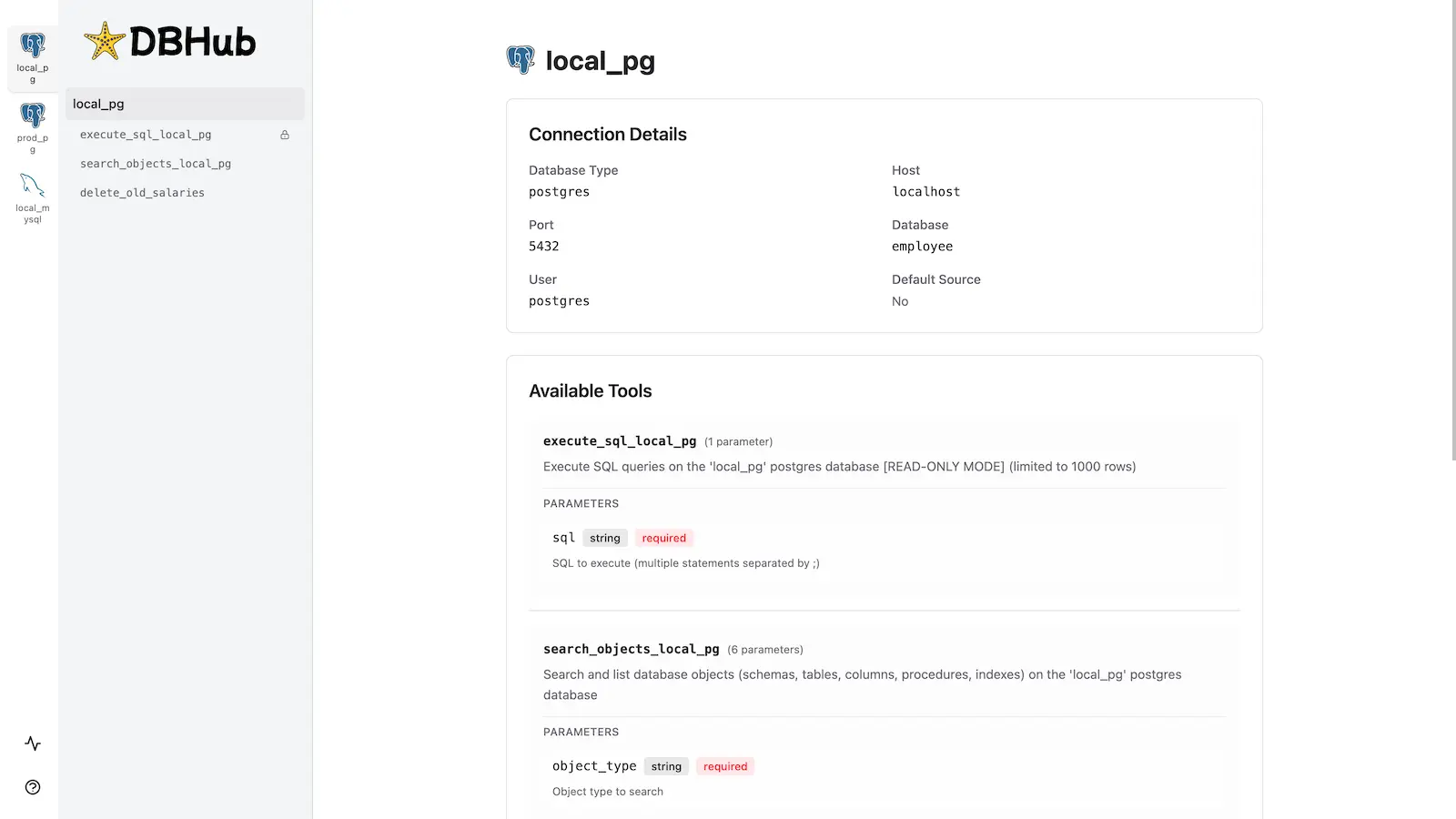
DBHub includes a built-in web interface for interacting with your database tools. It provides a visual way to execute queries, run custom tools, and view request traces without requiring an MCP client.
Installation
See the full Installation Guide for detailed instructions.
Quick Start
Docker:
docker run --rm --init \
   --name dbhub \
   --publish 8080:8080 \
   bytebase/dbhub \
   --transport http \
   --port 8080 \
   --dsn "postgres://user:password@localhost:5432/dbname?sslmode=disable"
NPM: (requires Node.js >= 22.5.0)
npx @bytebase/dbhub@latest --transport http --port 8080 --dsn "postgres://user:password@localhost:5432/dbname?sslmode=disable"
Demo Mode:
npx @bytebase/dbhub@latest --transport http --port 8080 --demo
Restrict to loopback (recommended for production):
npx @bytebase/dbhub@latest --transport http --host 127.0.0.1 --port 8080 --demo
The HTTP transport defaults to
--host 0.0.0.0, exposing DBHub on every network interface. For production, bind to127.0.0.1and front DBHub with a reverse proxy (nginx/Caddy) or firewall — DBHub does not authenticate HTTP clients.
See Command-Line Options for all available parameters.
Multi-Database Setup
Connect to multiple databases simultaneously using TOML configuration files. Perfect for managing production, staging, and development databases from a single DBHub instance.
See Multi-Database Configuration for complete setup instructions.
Development
Requires Node.js >= 22.5.0 (DBHub uses the built-in node:sqlite module).
# Install dependencies
pnpm install

# Run in development mode
pnpm dev

# Build and run for production
pnpm build && pnpm start --transport stdio --dsn "postgres://user:password@localhost:5432/dbname"
Contributors
Star History
[
](https://www.star-history.com/?repos=bytebase%2Fdbhub&type=date&legend=top-left)
Reviews
No reviews yet. Be the first.
Related
@remote-mcp/example
@remote-mcp/example MCP server
Nanobot
A lightweight personal AI assistant framework
brainstorm-mcp
MCP server for multi-round AI brainstorming debates across multiple models
mh install mcps/dbhub